Quick Path
Quick folder path manager for After Effects. Save, organize and access your frequently used folders instantly. Features include color-coded paths, favorites, drag-and-drop reordering, 1/2 column view, and quick actions like Import, Open Project, Save As, and Import All Files.

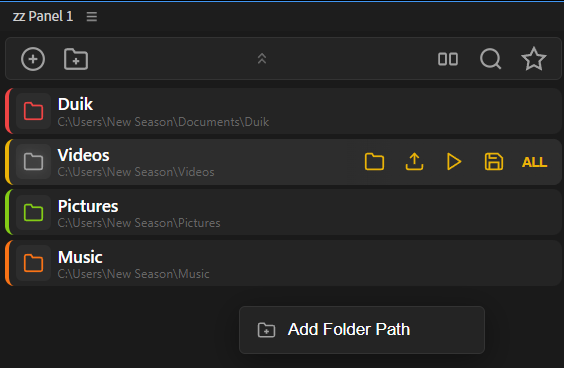
Overview
This tool is a fast folder path manager for After Effects, built to keep your most-used directories one click away. Save and organize your favorite folders, open the Import dialog directly in the chosen location, and use quick actions to import files, open projects, or save versions—without constantly browsing through File Explorer.



Features
- Save and manage frequently used folder paths
- Color-coded paths for quick visual grouping
- Favorites for important locations
- Drag & drop reordering
- Toggle 1 / 2 column view
- Quick actions per path:
- Add paths by + button or by using Catch from the Project panel
- Right-click menu: Favorite / Edit / Delete
- Collapsible header for a cleaner workspace
How to Use
1. Click + to add a folder path, or use Catch to grab a file’s folder from the Project panel. 2. Single-click a saved path to open the Import dialog at that location. 3. Right-click a path for options: Favorite, Edit, Delete. 4. Hover over a path to access quick actions: - Open Folder, Import, Open Project, Save As, Import All 5. Click the grid icon to switch between 1-column and 2-column view. 6. Use the collapse button (↑↑) to minimize the header. 7. Drag and drop paths to reorder them.
Notes
- Use colors + favorites to keep client/project folders easy to spot.
- Import actions speed up asset loading when you work across the same directory structure daily.