Download
MotionDesk Panel
MotionDesk Panel is an extension for Adobe After Effects designed to give you fast and easy access to all the creative tools and scripts we've developed to boost your productivity and unleash your creativity inside After Effects.
Compatible with After Effects CC 2022 and later • Windows & macOS
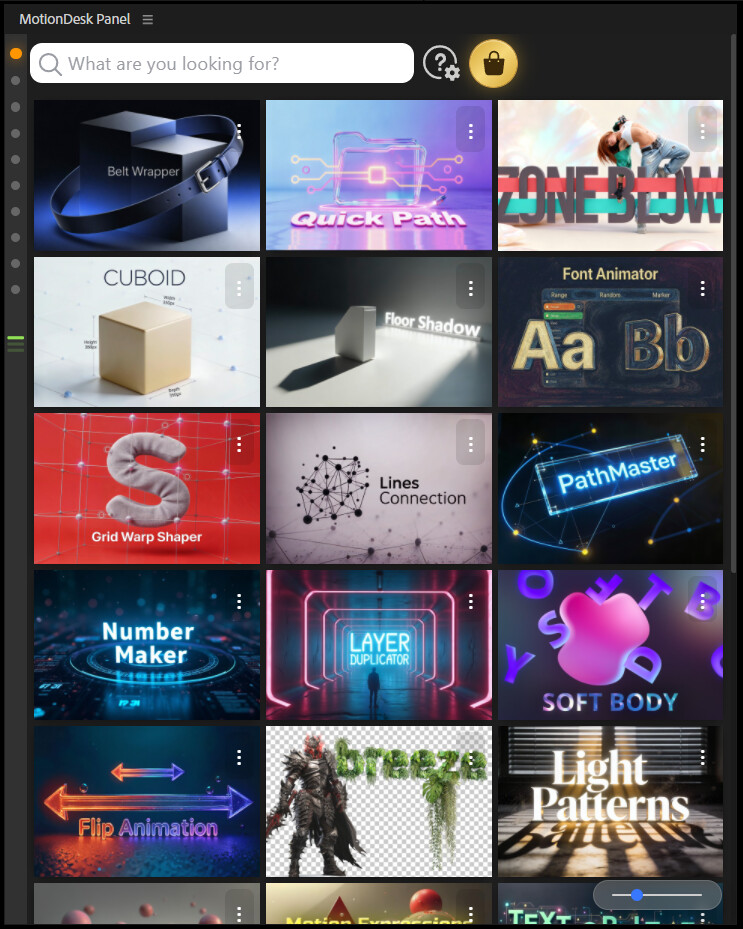
🔧 How to Install
Get started with MotionDesk Panel in just a few minutes
Download ZXP Installer
First, download the ZXP Installer — a free and safe tool to install .zxp extensions for Adobe apps.
ZXP Installer – aescripts aescripts.com/learn/zxp-installer →Install the Panel
Run ZXP Installer and simply drag & drop the MotionDesk Panel.zxp file into it.
Launch After Effects
Restart After Effects. You'll find MotionDesk Panel under:
Alternative Installer
If ZXP Installer doesn't work for you, try this alternative:
Anastasiy's Extension Manager install.anastasiy.com →Requirements
Frequently Asked Questions
Is MotionDesk Panel really free?
Yes! The panel itself and a selection of tools are completely free. Premium tools require a subscription, but you can start using many features for free.
Do I need an internet connection?
You'll need internet to download the panel and install tools from the marketplace. Once installed, most tools work offline.
Can I use it on multiple computers?
The free panel can be installed on any number of computers. Premium subscriptions allow activation on up to 2 machines simultaneously.
How do updates work?
The panel checks for updates automatically. When a new version or tool update is available, you'll see a notification inside the panel.
What if I have problems installing?
Check our video tutorials or contact support at motiondesk.mail@gmail.com. We typically respond within 24 hours.
Can I cancel my Premium subscription?
Yes, you can cancel anytime. Your access continues until the end of your billing period, and you keep the free tools forever.
Ready to Get Started?
Download MotionDesk Panel now and transform your After Effects workflow.
⬇ Download Free Panel