Property Driver
Link any target property to a source property with flexible mapping modes (Relative Δ, Direct value×Scale+Offset, Range Remap). Supports component selection (X/Y/Z), Reverse Direction, Smooth Frames, optional Manual Adjust slider, cross-comp references, and one-click Swap.

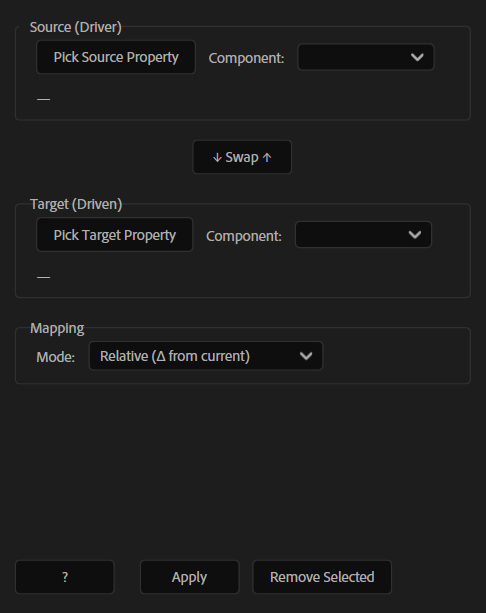
Overview
Property Driver links any target property to a source property using clean, flexible expression mapping. Pick a Driver and a Driven property (even across comps), choose the components you want (X/Y/Z), then map values using Relative offsets, Direct scaling, or full Range Remap. It’s a fast way to build controller-style setups without manually writing expressions.
Features
- Link any Driven property to a Driver property with one click
- Component selection for multi-dimensional properties (X / Y / Z)
- Mapping modes:
- Extra options:
- Cross-comp references supported
- One-click Swap (swap source/target)
- Clear removes only expressions created by Property Driver (doesn’t touch others)
- Clear comp/layer/property labels for quick verification
How to Use
1. Click Pick Source Property (Driver), then choose its Component from the dropdown next to it. 2. Click Pick Target Property (Driven), then choose its Component from the dropdown. 3. Choose a Mode: - Relative (Δ from current): uses current values as baselines. - Direct (value × Scale + Offset): linear mapping (can include a Manual Adjust slider). - Range Remap: maps Input (from→to) to Output (from→to) with optional Clamp. 4. Set your options: - Scale, Offset - Reverse Direction - Smooth Frames (how many frames to average) - For Range Remap: set the Input/Output ranges (+ Clamp if needed) 5. Click Apply to generate the expression on the target property. 6. Use ↓ Swap ↑ to swap Source and Target when needed. 7. To remove, select the layer(s) and click Clear/Remove Selected (only Property Driver expressions are removed). 8. Use the single-line labels to verify the Comp / Layer ▸ Property chain.
Notes
- Use Relative mode when you want the target to keep its current “base” value and only follow changes.
- Use Direct mode for classic controller workflows (Scale + Offset).
- Use Range Remap for converting ranges (e.g., 0–100 → 20–80) and keeping values clamped.