Path Master
Manipulate path and mask vertices directly within After Effects. Scale paths from Path/Layer/Comp center, move vertices in any direction, add points along segments with minimum distance control, and round sharp corners with adjustable radius. works with both Shape layers and Masks.
Overview
Path Master gives you direct, hands-on control over Shape paths and Mask paths inside After Effects.
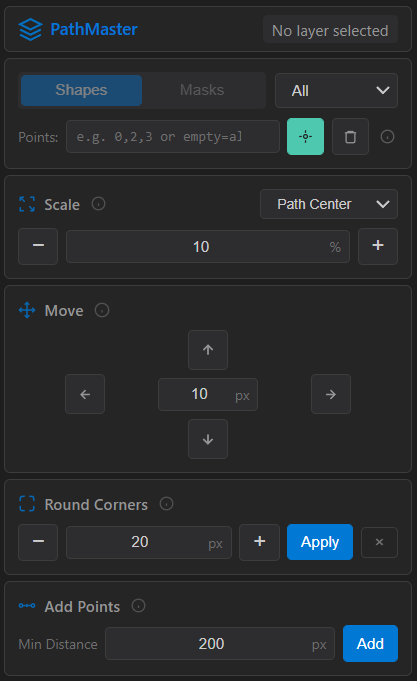
Scale a path from different centers, nudge vertices with precise pixel moves, round sharp corners, or automatically add extra points along long segments — all from a compact UI. You can even target specific vertices by index (like 0,2,4 or 1-5) for surgical edits.

Features
- Works with both Shape Layers and Masks
- Select a specific path or apply changes to All paths
- Target vertices by index:
- Vertex labeling tools
- Scale paths from:
- Move vertices in any direction with pixel-based steps
- Round Corners with adjustable radius, plus restore-to-sharp option
- Add Points along segments with minimum distance control (clean subdivision)
How to Use
1. Select a Shape Layer or any layer that has Masks.
2. Choose Shapes or Masks, then pick a specific path or All.
3. In Points, enter vertex indices to affect specific points (or leave empty for all):
- Example: 0,2,3 or 1-4
- Green button: create numbered vertex labels
- Red button: delete labels for the current layer
4. Scale
- Choose anchor: Path Center / Layer Center / Comp Center
- Set a percentage, then use + / −
5. Move
- Set pixel amount, then use the direction arrows (↑ ↓ ← →)
6. Round Corners
- Set radius, click Apply
- Use + / − to adjust
- Click ✕ to restore the original sharp corners
7. Add Points
- Set Min Distance (threshold)
- Click Add to subdivide long segments
Notes
- Vertex indices start at 0.
- “All” is great for batch edits across multiple paths, but use the Points filter for precise control.
- For best results, make sure the selected paths are editable (not locked/disabled).