Number Maker
Create counters, live numbers, and timers as text layers in After Effects. Use Count (by duration or speed), Follow Property (direct or range-mapped), or Timer (static or live), with full formatting for decimals, thousand separators, currency/units, symbols, and optional prefix/suffix wrapping.

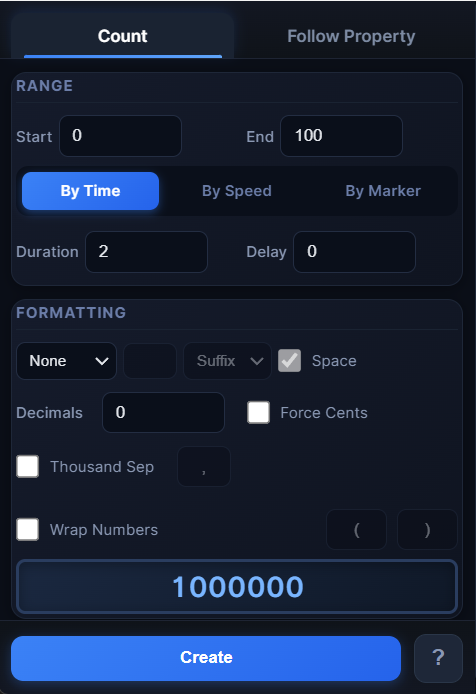
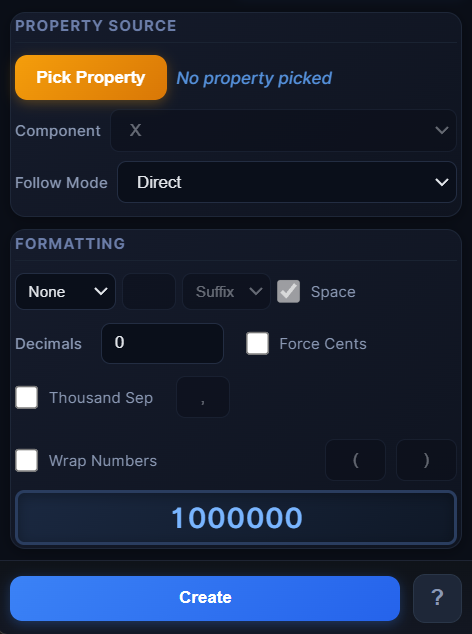
Overview
Number Maker creates animated numbers, live counters, property-driven values, and timers as editable text layers in After Effects. It supports Count, Follow Property, and Timer modes, with powerful formatting options (decimals, separators, currency/units, symbols, prefix/suffix wrapping). The UI stays compact by auto-resizing to show only the controls for the active mode.
Features
- 3 modes in one tool:
- Flexible number formatting:
- Instant live preview while adjusting settings
- Re-select the created text layer to keep editing Count values from the UI
How to Use
1. Open a composition. 2. Choose a Mode at the top:
Count - Set Start / End - Choose: - By Time → set Duration - By Speed → set Speed (units/s)
Follow Property - Click Pick Property - Choose component (X/Y/Z or pairs) - Choose: - Direct - Map Range → set In/Out ranges if needed
Timer - Enable Time/Timer - Choose: - Static Time (seconds), or - Live Timer → set Start/End/Direction and FPS (or Use comp FPS)
3. In Number Format, set: - Decimals, Thousand Separator - Symbol/unit + position + optional space - Add “.00” (optional) - Wrap Prefix/Suffix (optional) 4. Preview updates instantly. 5. Click Create Number Text (for Count/Follow), or use the Timer buttons to create Static Time / Live Timer text. 6. To edit later, re-select the created text layer to live-sync Count settings from the UI (Start/End/Duration/Speed).
Notes
- Map Range is ideal for converting values (e.g., slider 0–100 → 0–1,000).
- Use Use comp FPS for timers that must match the comp frame rate.
- Prefix/Suffix wrap is great for labels like “$”, “%”, “px”, or custom UI text.