Motion Expressions
Quickly apply customizable motion expressions (Wave, Wiggle, Shapes, Loop, Noise, Time*Factor) to any property with auto-generated controls on the same layer.
Overview
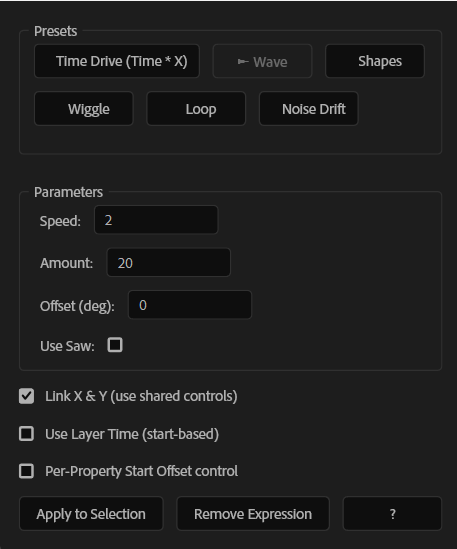
Motion Expressions lets you apply ready-to-use, fully adjustable motion expressions to almost any After Effects property in seconds. Choose a preset (Wave, Wiggle, Loop, Noise Drift, Shapes, or Time * Factor) and the script automatically creates clean on-layer controls, so you can animate and tweak everything from the Effect Controls—no manual expression editing needed.
Features
- One-click motion expressions for any property or transform
- Presets included:
- Auto-generated on-layer controls (Speed, Amount, Offset, Factor, etc.)
- Link X & Y option to share controls across axes (Position / Scale / Orientation)
- Optional start-based timing options for more control
- Clean removal: removes both the expression and its created controls
How to Use
1. Select the property (or layer transform) you want to animate. 2. Choose a preset: - Time * Factor, Wave, Wiggle, Loop In/Out, Noise Drift, or Shapes. 3. Adjust the default parameters (Speed, Amount, Offset, Factor, etc.). The script will create these controls on the same layer. 4. (Optional) Enable Link X & Y to use shared controls across axes (useful for Position/Scale/Orientation). 5. Click Apply to Selection to add the expression. 6. To remove it, click Remove Expression (this clears the expression and its generated controls).
Notes
- For multi-axis properties, Link X & Y helps keep motion consistent and easier to manage.
- You can keyframe the generated controls to animate the behavior over time.
- If you change your selection, re-apply to update the expression setup on the new property.