Layer Duplicator
Duplicate a selected layer N times and drive offsets (Position/Scale/Rotation/Opacity/Color/Blur) with an endpoint-preserving Bias. Includes optional parenting and time offset; 2D/3D aware; Scale supports Link X,Y.
Overview
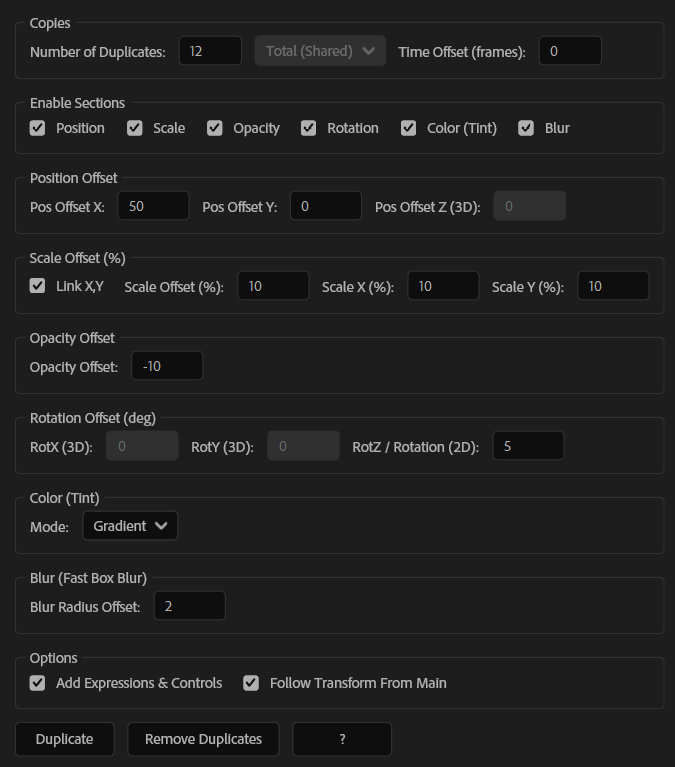
Layer Duplicator creates multiple copies of your selected layer(s) and automatically drives their offsets using a controller-based setup. You can build clean stacks, trails, and progressive transformations by offsetting Position, Scale, Rotation, Opacity, Color, and Blur, with a smart Bias that preserves the start/end behavior for more natural distribution. It also supports optional parenting and time offsets, and works in both 2D and 3D.
Features
- Duplicate one layer or multiple layers N times
- Offset controls for:
- Endpoint-preserving Bias for smoother, more controllable distribution
- Optional Parenting setup
- Optional Time Offset (frames) for staggered animation trails
- 2D / 3D aware workflow
- Creates a *_Control layer with clean Expressions & Controls (optional)
How to Use
1. Select one layer (or as many layers as you need). 2. Set Duplicates and Time Offset. 3. Enable the sections you want (Position / Scale / Rotation / Opacity / Color / Blur) and enter your offset values. - For Scale, you can enable Link X,Y. 4. Click Duplicate. 5. (Default) If Add Expressions & Controls is enabled: - The source layer is renamed to *_Control - Amount / Bias controls are added so you can tweak the whole setup anytime.
Notes
- Use Time Offset to create instant motion trails without manually shifting layers in time.
- Bias is especially useful when you want the distribution to feel balanced while keeping clean endpoints.
- You can rerun the tool on the same selection to rebuild/update your duplicate setup.